Free, Cloud-Hosted Reminders and Scheduled Tasks for Your Business—No Install Required
Are you tired of losing track of critical client follow-ups, missing maintenance windows, or paying expensive monthly fees for clunky team calendars? Do you need a straightforward, fast way to map out operational alerts without giving away your business data to massive tech conglomerates?
AskNex Reminder Software is a high-performance, completely free cloud-hosted task scheduling and reminder engine designed specifically for local service providers, small business and growing business owners, and independent contractors. There is nothing to download or install—sign up in seconds, configure instant daily or one-time operational alerts, and keep your business running smoothly on any desktop or mobile device.
Tailored for Local Service-Based Businesses
AskNex Reminder Software adapts natively to the day-to-day coordination workflows of your specific industry vertical:
- Salons & Wellness: Schedule internal operational alerts for inventory restocks, machine cleaning cycles, or staff shift changeovers seamlessly.
- Professional Consultants: Set precise, time-stamped task cards to prepare for client discovery calls, lock down invoice follow-ups, and organize project milestones.
- Home Services & Trades: Keep field teams running on time by setting specific reminders for site arrival windows, material pickups, and equipment maintenance dates.
5 Ways AskNex Reminder Software Drives Business Efficiency
1. Set Your Alerts Once with Smart Recurrence Models
Stop wasting time rewriting the same daily checklists over and over. AskNex uses an intuitive task configuration tool that allows you to specify whether a task is a clean One-time execution or a Daily repeating requirement. Once defined, the system handles the distribution pipeline, letting you focus entirely on your physical business operations instead of an administration portal.
2. Zero Technical Friction—Lightweight Web Dashboard
Our application interface is optimized to minimize browser overhead and eliminate digital clutter.
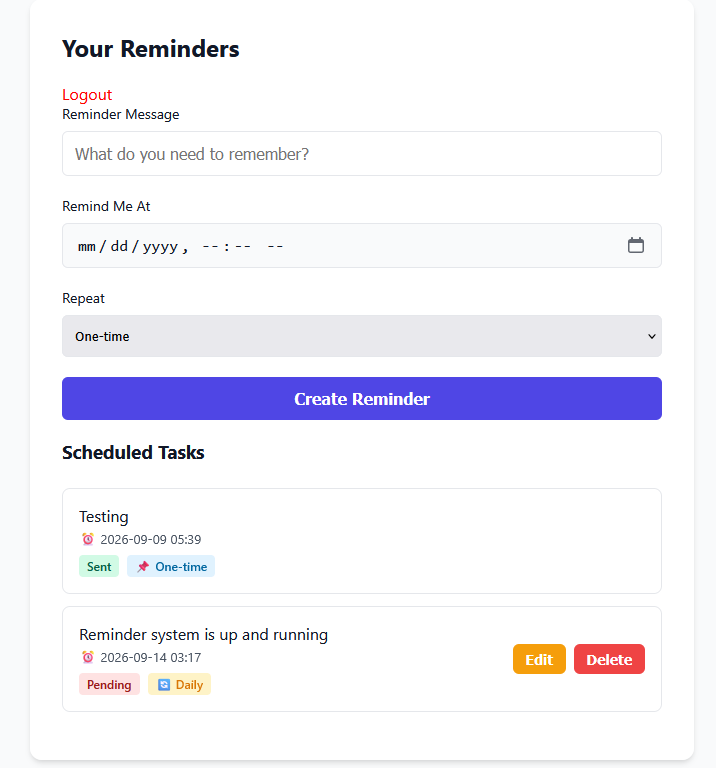
- Lightning-Fast Cloud Interface: The clean form entry field ensures you can submit a task name, calendar date, and specific time marker in under five seconds.
- Mobile Ready Access: Built without heavy backend tracking pixels or clunky analytical wrappers, the platform functions flawlessly over mobile cell networks while you are working in the field.
3. Dedicated Task Status Pipeline Tracking
Eliminate guesswork by viewing your operational queue in real-time. The active dashboard cleanly separates tasks by color-coded processing states:
- Pending Status: Displays upcoming events, daily recurring routines, and future dates cleanly highlighted so you can anticipate the week’s operational load.
- Sent/Completed Status: Provides verifiable system logs showing exactly when an alert was triggered and dispatched, keeping an audit trail of your workflows.
4. Ultimate Local Data Control & Privacy
Protect your proprietary business data and client schedules from third-party advertising miners. AskNex executes inside an isolated cloud sandbox environment. Your task boards, timing schedules, and personal reminder messages remain 100% private, protected, and localized exclusively to your business profile.
5. Instant In-Line Task Editing & Management
Business environments change fast. If an assignment gets delayed or a client changes an appointment date, you don’t need to delete the entry and start over. A clean, tactile management interface gives you instant Edit and Delete control directly on individual task cards, instantly syncing updates to the cloud application workspace.
Comparison: AskNex Reminder Software vs. Expensive Task Managers
| Comparison Feature | AskNex Reminder Software | Traditional SaaS Platforms |
|---|---|---|
| 💰 Monthly Pricing | $0 (100% Free Forever) | $8 to $25+ per user, every month |
| ⚡ Dashboard Footprint | Minimalist form built for quick field entry | Bloated interfaces that lag on phone browsers |
| 🛡️ Business Data Privacy | Private cloud database; zero tracking pixels | Tracks user patterns to build marketing profiles |
| ⚙️ Interface Flexibility | Tactile inline Edit and Delete actions | Deep settings buried inside multi-layer submenus |
Get Your Business Organized in 3 Simple Steps
1. Write Your Reminder Message
Type exactly what you or your team need to remember into the clear text input field. Keep it short and actionable—like “Call back salon client” or “Restock inventory supplies.”
2. Set Your Date, Time, and Recurrence
Use the built-in calendar picker to choose the exact date and time for the alert. Then, drop down the recurrence menu to select whether this is a One-time task or a Daily routine.
3. Hit Create and Track in Real-Time
Click the purple Create Reminder button. Your new task instantly populates below under Scheduled Tasks, where you can track it via color-coded tags (Pending or Sent) or quickly make changes using the Edit and Delete actions.
Frequently Asked Questions
Is AskNex Reminder Software actually free? Are there any hidden fees?
Yes, AskNex Reminder Software is completely free to access and use for small and local businesses. There are no credit cards required, no premium tier walls for standard configurations, and absolutely no limits on tracking your necessary business task queues.
Do my employees need to download a mobile app to manage tasks?
No. AskNex is a 100% cloud-hosted web application. Any team member can instantly manage, edit, or check the task statuses by opening the secure dashboard URL in a standard smartphone, tablet, or desktop web browser.
Can I set up daily recurring checklists alongside unique one-time alerts?
Yes. The scheduling matrix contains a flexible recurrence selector drop-down menu. You can customize standard tasks to repeat on a Daily interval baseline for ongoing storefront chores, or keep them locked to a One-time alert parameters for unique events.
How accurate is the time-stamping feature across different time zones?
The software utilizes real-time global time formatting arrays (YYYY-MM-DD HH:MM). It interprets device location parameters natively, ensuring that whether a field technician is logging an action in the morning or an office manager is reviewing tasks late at night, the execution timestamps align exactly.
What happens if I need to instantly remove a task from the active queue?
Every scheduled item generated features direct control endpoints. Simply look at your main dashboard list, locate the specific task card, and click the red Delete button to instantly clear it from your operational processing pipeline.
Take Absolute Control of Your Daily Operations Today
Stop letting disorganized schedules or expensive software subscriptions drain your small business’s tight margins. Keep your operational logs safe, streamline employee accountability, and experience a lightning-fast approach to daily task management.