For customer onboarding specialists, implementation managers, and data migration teams, client data ingestion is your biggest bottleneck.
Every time you onboard a new customer, you receive a legacy spreadsheet full of broken formatting, conflicting date structures, and character anomalies. If you try to upload these files directly, your CRM or database throws rejection codes. Yet, if you try to use convenient cloud-based AI cleaners to speed things up, you run into a major roadblock: privacy compliance. Uploading private customer logs, financial records, or vendor sheets to a third-party server can violate corporate security policies and strict data privacy regulations.
The alternative isn’t forcing your implementation staff to manually filter thousands of rows in Excel. Here is how a high-performance local data sandbox cleans, standardizes, and pre-formats client files locally and securely.
🛑 The Implementation Bottlenecks That Delay Time-to-Value
When you pull historical data out of aging legacy systems, structural errors are practically guaranteed. These errors cause critical failures during platform migrations:
- The Date Format Clash: Importers like HubSpot or rigid database structures require precise timelines. When a client sheet mixes
04/15/2026,2026.04.15, and15-Apr-2026across a single row, database tracking breaks instantly. - Escaped Delimiter Collapses: If a product matrix or lead file contains internal formatting marks (like descriptive text reading
"Size: 10, Color: Blue"), typical loaders misinterpret the comma. This shifts subsequent columns to the right, corrupting data integrity. - Numeric Field Contamination: Financial ledgers or inventory matrices frequently export with messy alphabetical strings appended (e.g.,
$120.50 USDorApprox. 45). These text strings crash calculation engines.
When your team spends days manually restructuring text files, it stalls client onboarding velocity, delays time-to-value, and wastes costly technical engineering hours.
🛠 The Desktop Sandbox Strategy: Format Safely for HubSpot and Shopify
Instead of relying on cloud data tools that increase your security liabilities, advanced implementation teams use ultra-fast, bare-metal local engines to preprocess incoming spreadsheets.
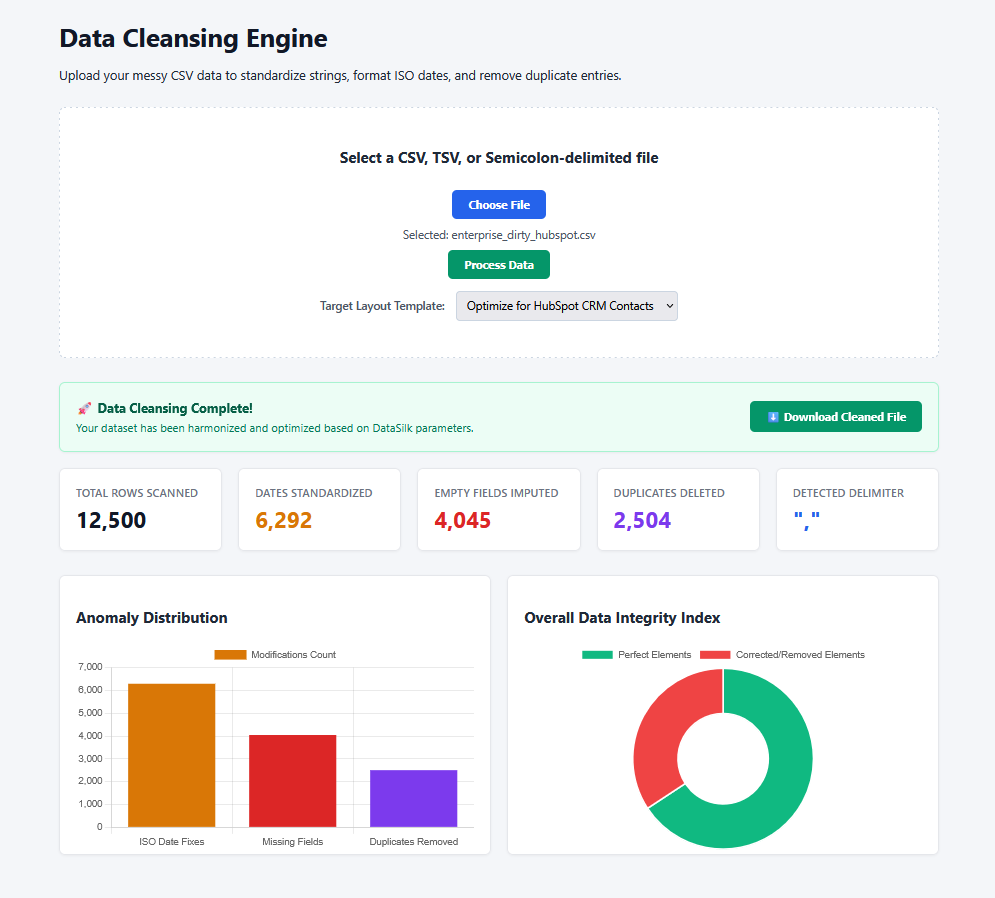
This data cleansing utility runs an embedded drag-and-drop web dashboard entirely on your local machine. It lets your onboarding staff profile schemas and standardize layouts through a secure browser interface before touching production databases:
| Technical Challenge | Local Engine Automation Feature | Direct Onboarding Impact |
|---|---|---|
| System-Specific Formatting | Translates column headers to match rigid target structures like HubSpot Contacts or Shopify Product Fields. | Prevents upload errors; rows align with destination requirements out-of-the-box. |
| Mixed Character Patterns | Uses regex loops to extract clean numeric digits from phone numbers and price fields. | Isolates clean metrics (e.g., formatting raw numbers to standard layouts like (555) 867-5309). |
| Erratic Date Columns | Scans header labels dynamically and converts mixed date strings into uniform ISO standards (YYYY-MM-DD). |
Ensures chronological tracking and customer timelines remain perfectly intact. |
| Missing Schema Elements | Profiles data styles instantly to inject logical fallbacks (0 for values, unknown for descriptive text strings). |
Eliminates platform import rejections caused by empty fields or null entries. |
| Redundant Observations | Harshes exact duplicate rows down in memory space, filtering out repetitive elements. | Keeps target production systems lean, clean, and free of duplicate lead entries. |
🔒 Uncompromising Data Security with a Zero Cloud Footprint
The ultimate advantage of a native local desktop engine is total compliance isolation. Your data never leaves your computer.
The software intercepts, parses, and cleans files directly inside your machine’s local hardware layer. Because it completely avoids external web calls or internet-facing storage buckets, your data handling steps stay inside strict corporate firewalls. You get enterprise-level privacy protection with the speed of an optimized local processing core.
❓ Frequently Asked Questions
What is a secure local data cleansing sandbox?
A secure local data cleansing sandbox is a desktop utility that uses local processing memory to parse and correct formatting errors in spreadsheets (like CSV or text files) without transmitting data over the internet, making it compliant with strict privacy regulations.
How do onboarding teams prevent CRM import failures using data cleaning software?
Onboarding teams run messy client files through a cleansing engine first to standardize layout schemas. The software dynamically translates headers to match specific target environments (like HubSpot or Shopify) and corrects dates and numerical fields to prevent database rejection errors.
Why should regulated industries avoid cloud data cleansing software?
Cloud platforms upload raw proprietary records, financial ledgers, or customer information to third-party infrastructure. This data transfer introduces security vulnerabilities, compliance friction, and potential privacy violations in heavily regulated fields like healthcare, legal tech, or finance.
🚀 Maximize Your Implementation Velocity
Stop losing days to manual spreadsheet corrections and failed imports. Accelerate your user onboarding timelines, eliminate database pollution, and scale your client migration workflows safely.
Contact Our Enterprise Integration Specialists to custom-build precise structural formatting rules for your software ecosystem.