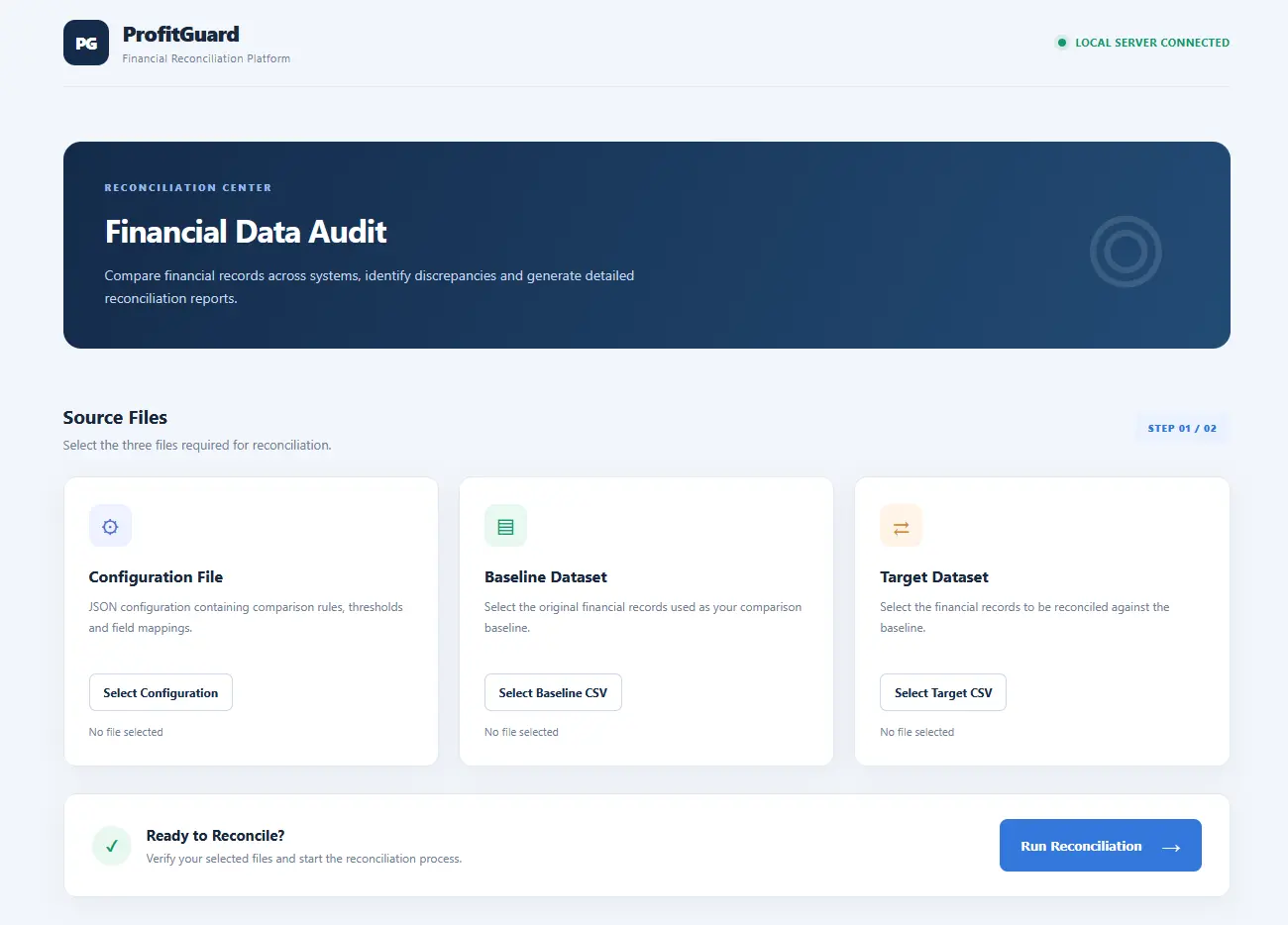
ProfitGuard – Bringing Confidence to Financial Data Reconciliation
Overview
Financial information is frequently maintained across multiple business systems. Accounting platforms, billing applications, payment gateways and operational databases may all contain records relating to the same transactions.
Ensuring that these records agree is essential for maintaining financial accuracy, identifying discrepancies and supporting reliable business reporting.
However, comparing information across independent systems can be a time-consuming and repetitive process, particularly when datasets contain thousands of records or use different data formats.
ProfitGuard was developed to address this challenge.
It is a configurable financial data reconciliation application designed to compare independent datasets, identify discrepancies and present the results in a clear, accessible report.
ProfitGuard includes an integrated configuration editor for creating, saving and maintaining reconciliation rules.
By automating key aspects of the reconciliation process, ProfitGuard provides a structured approach to validating financial information and investigating exceptions.
The Business Challenge
Businesses often encounter inconsistencies when comparing financial records maintained across different platforms.
Common examples include:
- Transactions appearing in one system but not another.
- Different reference numbers or column names being used across systems.
- Financial amounts differing because of rounding or calculation variations.
- Duplicate transaction references.
- Inconsistent date formats.
- Differences in customer, payment or transaction information.
These discrepancies can make manual reconciliation difficult and increase the effort required to establish whether two datasets accurately represent the same underlying business activity.
The challenge becomes more significant when reconciliation needs to be performed regularly or across multiple data sources.
The ProfitGuard Approach
ProfitGuard provides an automated means of comparing two independent datasets using configurable reconciliation rules.
Rather than relying on fixed comparison criteria, the application allows reconciliation settings to be defined according to the requirements of the datasets being examined.
This makes it possible to use the same application across different business scenarios without having to rewrite the underlying reconciliation logic.
The process is straightforward:
- Select the reconciliation configuration.
- Select the original or baseline dataset.
- Select the target dataset.
- Run the reconciliation.
- Review the resulting exceptions and reports.
The application processes the datasets and identifies records or values that do not satisfy the configured comparison rules.
Intelligent Configuration Management
An important feature of ProfitGuard is its integrated browser-based configuration editor.
Rather than requiring users to create or modify JSON files manually, ProfitGuard provides an interface for managing reconciliation configurations directly within the application.
Users can create new configurations, save them for future use, load existing configurations and modify their settings as business requirements change.
Flexible Reconciliation Rules
The configuration editor provides access to the principal settings governing the reconciliation process, including:
- Primary Key Selection: Define the field used to identify and match records.
- Comparison Fields: Specify which fields should be examined.
- Column Mapping: Associate differently named fields across independent systems.
- Numeric Thresholds: Establish acceptable absolute financial differences.
- Percentage Thresholds: Define acceptable percentage-based variances.
- Date Fields: Identify fields requiring date normalization.
- Regular Expression Rules: Define validation patterns for selected fields.
Reusable Configuration Profiles
The ability to save and reload configurations provides a practical foundation for managing different reconciliation scenarios.
For example, a business could maintain separate configurations for:
- Accounts payable reconciliation.
- Payment gateway verification.
- Customer database comparison.
- Financial system migration.
- Operational data validation.
Each configuration can retain its own comparison rules and mappings.
This reduces repetitive setup work and allows reconciliation requirements to be maintained independently of the underlying application.
A More Accessible Workflow
By integrating configuration management into the browser interface, ProfitGuard makes advanced reconciliation settings more accessible to users who may not be familiar with JSON or programming.
The configuration editor complements the reconciliation engine, providing a single application environment in which users can define, maintain and apply their comparison rules.
Key Business Capabilities
1. Identify Missing Transactions
One of the most important reconciliation requirements is establishing whether records exist in both systems.
ProfitGuard identifies:
- Records present in the baseline but missing from the target.
- Records present in the target but missing from the baseline.
This helps businesses investigate missing transactions, unexpected entries and differences between independent financial records.
2. Financial Variance Detection
Financial values do not always match exactly.
Differences may arise from rounding, calculation methods or other legitimate processing variations.
ProfitGuard supports configurable numeric and percentage-based tolerance thresholds.
This allows businesses to define acceptable differences and identify values that exceed their specified limits.
Rather than treating every numerical difference as an error, reconciliation can be performed according to defined business tolerances.
3. Configurable Data Matching
Different business applications often use different names for equivalent data fields.
For example:
| Original System | Target System |
|---|---|
| TransactionID | ReferenceNumber |
| CustomerCode | AccountNumber |
| InvoiceDate | PostingDate |
| NetAmount | TransactionValue |
ProfitGuard supports configurable column mappings, allowing equivalent fields to be compared even when their names differ.
This is particularly useful when working with data exported from separate accounting, billing or operational platforms.
4. Date and Data Validation
Differences in formatting do not necessarily indicate differences in the underlying information.
ProfitGuard supports date normalization to accommodate certain variations in date representation.
It also supports configurable regular expression validation for fields that must conform to specific formatting requirements.
These capabilities help distinguish formatting inconsistencies from substantive data discrepancies.
5. Duplicate Record Handling
Duplicate transaction references can complicate reconciliation.
The current implementation includes functionality to consolidate duplicate records, adding numeric values and combining distinct textual values.
This provides a starting point for handling datasets where multiple entries share a common reference.
The appropriate aggregation rules should be configured and validated according to the business meaning of each field.
A Clear View of Reconciliation Results
Identifying discrepancies is only part of the reconciliation process.
Businesses also need to understand what has been identified and where further investigation may be necessary.
ProfitGuard generates an HTML reconciliation dashboard designed to present the results in an accessible format.
The dashboard includes:
- Total baseline records.
- Total target records.
- Missing record counts.
- Financial variance counts.
- Exception descriptions.
- Severity classifications.
- Technical exception identifiers.
The objective is to make reconciliation findings easier to review without requiring users to interpret raw data files or technical output.
Structured Exception Reporting
In addition to the HTML dashboard, ProfitGuard generates a JSON exception file.
This provides a structured representation of the reconciliation findings and creates opportunities for subsequent analysis or integration with other business applications.
Together, these reporting formats provide both a human-readable overview and machine-readable exception data.
Designed for Practical Business Use
ProfitGuard was developed as a standalone desktop application with a browser-based interface.
Users do not need to enter filenames through a command prompt or interact directly with the underlying C++ application.
Instead, they select the required files through a straightforward browser interface and initiate reconciliation using a single action.
The application runs its processing locally through an embedded HTTP server.
This approach provides an accessible user experience while keeping the reconciliation engine within the application itself.
Potential Business Applications
Although ProfitGuard was initially conceived around financial reconciliation, its configurable comparison capabilities have potential applications across several business areas.
Accounting and Financial Reconciliation
Compare financial records from accounting systems, billing applications and payment platforms.
Payment and Transaction Verification
Identify missing, unexpected or inconsistent transaction records across independent systems.
Data Migration Validation
Compare datasets before and after migration to identify missing records and changes in important data fields.
Operational Data Auditing
Validate information maintained across separate operational applications and databases.
Business Data Quality Assurance
Identify inconsistencies and formatting issues in structured business datasets.
These are potential application areas rather than individually validated integrations.
Business Benefits
By automating the comparison of independent datasets, ProfitGuard aims to provide several practical benefits.
| Business Requirement | ProfitGuard Capability |
|---|---|
| Identify missing records | Automated record matching |
| Investigate unexpected transactions | Exception identification |
| Monitor financial differences | Configurable variance thresholds |
| Compare different data structures | Flexible column mapping |
| Validate date information | Date normalization |
| Check structured values | Regular expression validation |
| Review reconciliation findings | HTML dashboard |
| Process exceptions further | JSON output |
The overall objective is to reduce repetitive manual comparison work and provide a more consistent, transparent approach to data reconciliation.
Actual time savings and accuracy improvements would need to be established through representative business testing.
Current Implementation
ProfitGuard has progressed from an original command-line reconciliation program into a working browser-based application.
The current implementation includes:
- Configurable JSON reconciliation settings.
- CSV dataset selection.
- Automated primary-key matching.
- Numeric and percentage-based comparisons.
- Date normalization.
- Regular expression validation.
- Exception identification.
- HTML dashboard generation.
- JSON exception reporting.
- Local browser-based operation.
The application has been built using C++20 and lightweight web technologies.
Conclusion
Financial reconciliation is an important part of maintaining confidence in business information.
When records are maintained across multiple independent systems, identifying discrepancies and establishing data consistency can require considerable manual effort.
ProfitGuard provides a configurable approach to automating this process.
By combining flexible data matching, financial tolerance validation, exception detection and accessible reporting, it offers a practical foundation for comparing business datasets and investigating inconsistencies.
Profit Guard - Greater Visibility. Better Data Integrity. More Confidence in Your Numbers.
Custom Financial Data Reconciliation Services
Make Your Business Data Work Together.
Financial information spread across multiple systems can make accurate reconciliation challenging.
We develop tailored data reconciliation solutions that compare independent datasets, identify discrepancies and provide clear, actionable reporting.
Using our configurable reconciliation technology, we can adapt comparison rules to your business requirements, helping you gain greater visibility into the accuracy and consistency of your data.
Our services include:
-
Financial and transaction reconciliation.
-
Accounting and payment data comparison.
-
System migration verification.
-
Automated exception reporting.
-
Bespoke reconciliation solutions.